VPN на iOS через Anywhere Proxy — настройка DazeLink
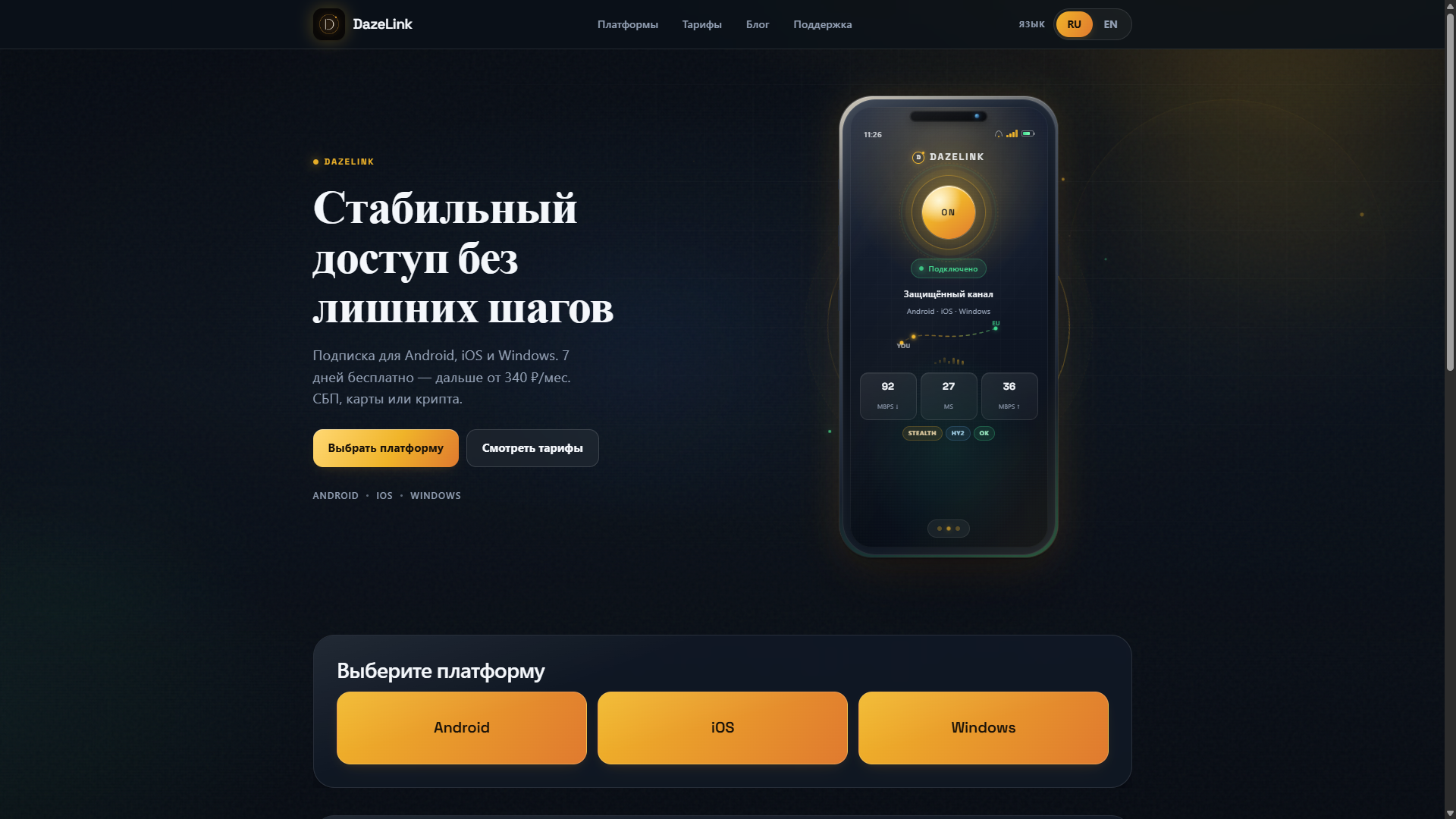
Запросы «vpn ios», «vpn ios скачать», «vpn на айфон» сходятся к одному сценарию: клиент из App Store + рабочая подписка. Коммерческий гайд без лишнего: как добавить подписку в Anywhere Proxy. В экосистеме DazeLink основной путь для iOS — Anywhere Proxy и subscription URL с dazelink.com. Если Happ уже установлен, его можно оставить как альтернативу с тем же URL.
Общий контекст про подписку: Happ VPN и подписка (исторический гайд; для новых установок используйте Anywhere Proxy).

Почему на iOS путь другой, чем на Android
На Android DazeLink ставится как своё приложение (гайд). На iOS поддерживаемая схема — клиент из App Store + URL подписки. Так проще:
- обновлять узлы без ручного импорта каждого URI;
- переживать смену телефона;
- не таскать IPA с форумов.
Anywhere Proxy — клиент. Источник доступа — DazeLink.
Установка Anywhere Proxy
- Откройте App Store по официальной ссылке Anywhere Proxy.
- Установите на iPhone или iPad. Нужен iOS 18+.
- Не ставьте «моды» и IPA из чатов: после обновления iOS такие сборки часто ломают VPN-профиль.
Проверьте название и издателя (Argsment Limited) в App Store.
Получение subscription URL на DazeLink
- Зайдите на главную.
- Выберите iOS, укажите email, при необходимости оплатите тариф.
- Скопируйте subscription URL целиком (без пробелов по краям).
- В Anywhere Proxy: импорт подписки по URL (или QR).
- Обновите список профилей.
- Подключите узел и подтвердите системный запрос iOS на VPN-конфигурацию.
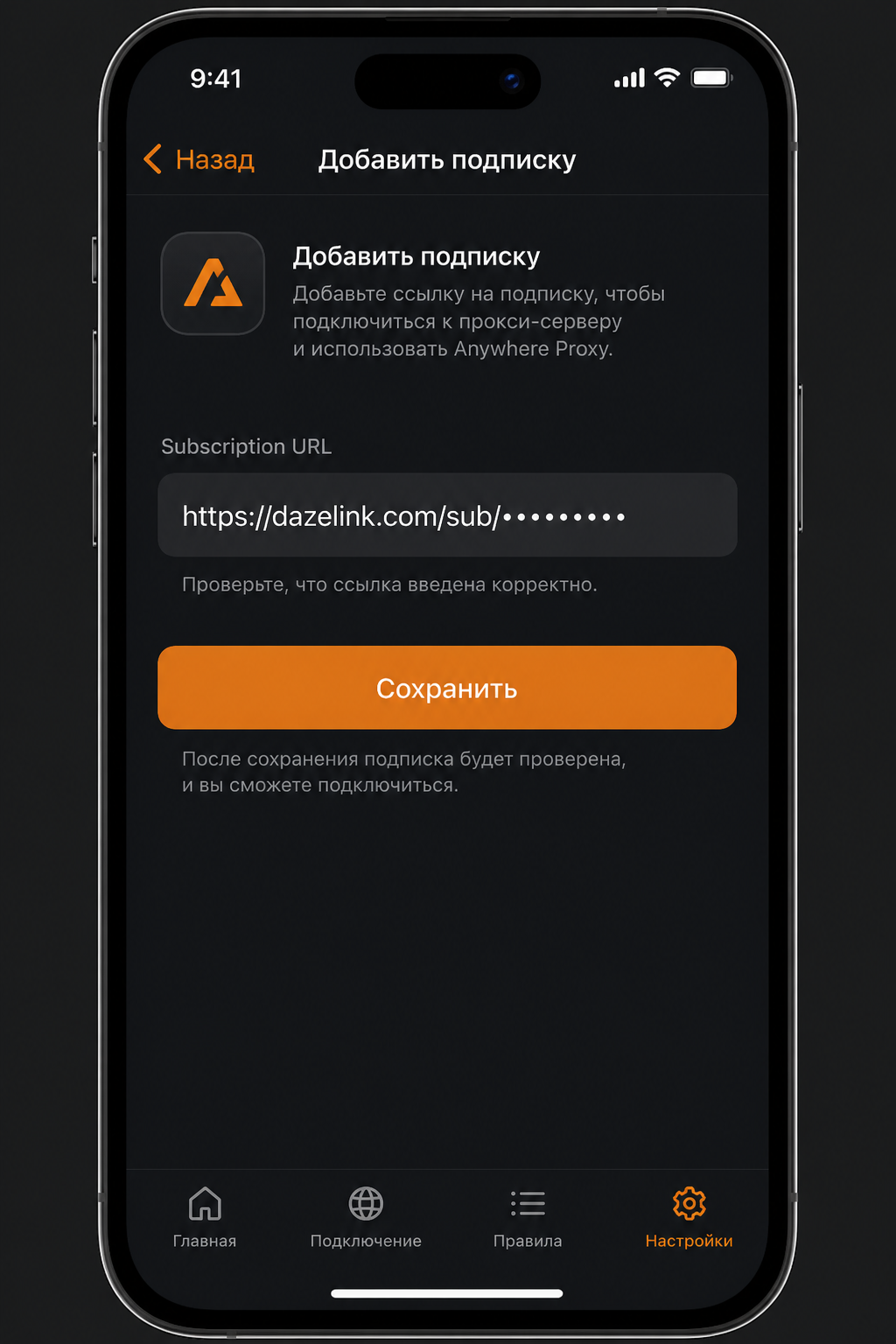
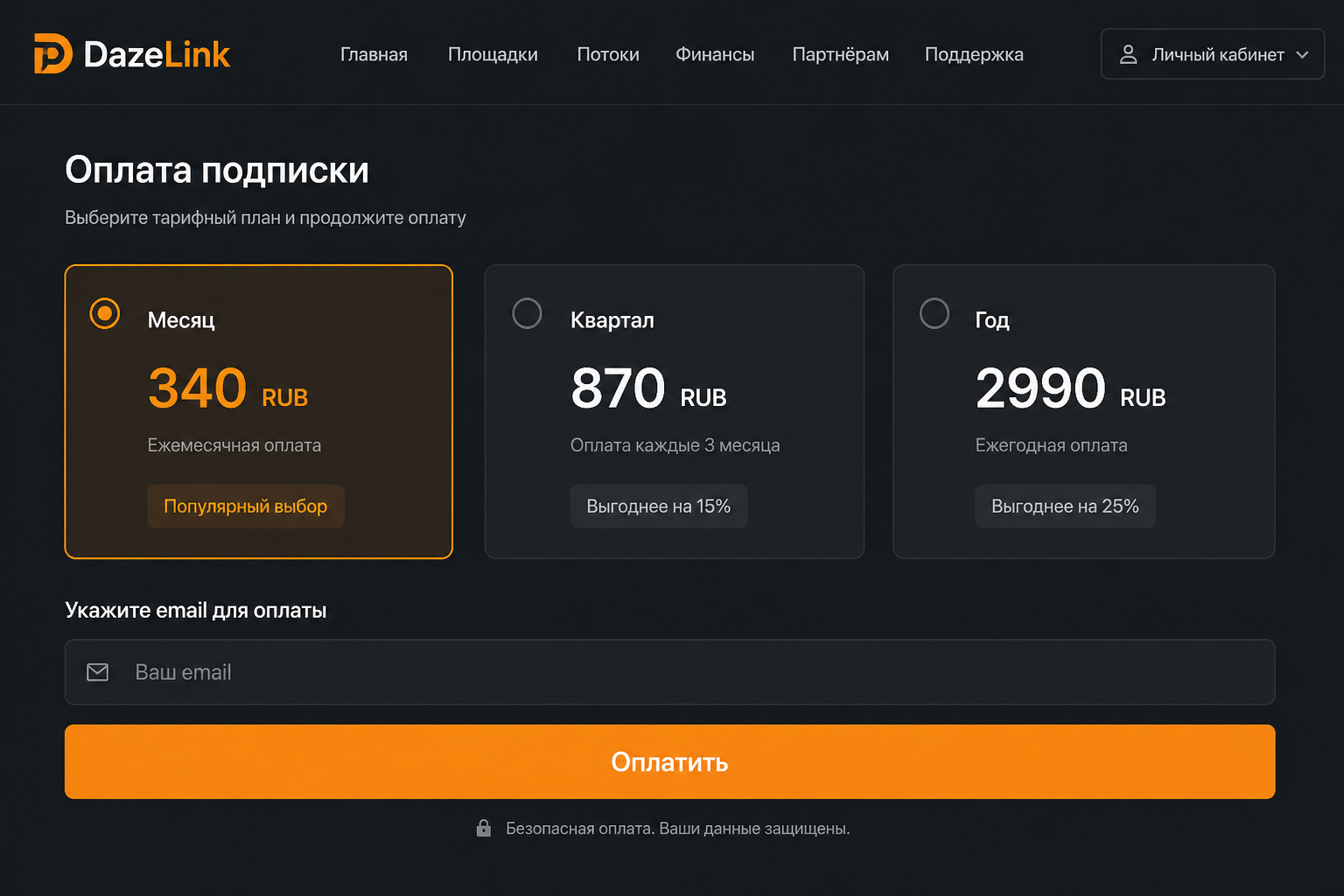
Сохраните URL в надёжных заметках. Не публикуйте: по ссылке можно пользоваться вашим доступом до отзыва или истечения тарифа.
Альтернатива: Happ уже установлен
Если на телефоне уже стоит Happ и он работает:
- Не обязательно переходить на Anywhere Proxy.
- Вставьте тот же subscription URL в Happ.
- Обновите подписку (pull / Update) после оплаты на сайте.
Новым пользователям рекомендуем Anywhere Proxy: приложение доступно в российском App Store.
Как понять, что всё настроено правильно
- после обновления подписки видны профили DazeLink;
- в «Настройки → VPN» видно активное соединение;
- сайты и мессенджеры открываются без бесконечной загрузки;
- после смены Wi‑Fi → LTE соединение восстанавливается или поднимается повторным тапом.
Если профили есть, а трафика нет: обновите подписку → другой профиль → см. стабильность.
Типовые проблемы на iOS
«Не удалось добавить VPN-конфигурацию». Проверьте Экранное время, MDM и ограничения VPN.
Работает только на Wi‑Fi. Обновите подписку, смените профиль. База по протоколам: VLESS Reality и Hysteria2.
После продления тарифа «старый» доступ. Без refresh клиент держит кэш. Обновите подписку в приложении.
Пустой список после добавления URL. Обрезали строку, лишний пробел или тариф неактивен. Удалите подписку → вставьте URL снова.
Конфликт с другим VPN. Оставьте один активный туннель.
Практические привычки
- После оплаты всегда делайте refresh подписки в клиенте.
- Перед важной поездкой проверьте LTE заранее.
- Не держите десятки чужих подписок «на всякий случай».
Частые вопросы
Нужен ли Happ?
Нет, для новой установки достаточно Anywhere Proxy. Happ оставляем как альтернативу, если он уже стоит.
Нужен ли компьютер для настройки iPhone?
Нет. Всё делается на телефоне: сайт или Telegram-бот → App Store → импорт URL.
Где скачать клиент?
Официальная кнопка на dazelink.com после выбора iOS ведёт в App Store на Anywhere Proxy. Ссылка на Happ остаётся как запасной вариант.
Куда идти дальше
VPN on iOS via Anywhere Proxy — setting up DazeLink
Searches like "vpn ios", "vpn ios download", "vpn on iphone" all lead to the same scenario: a client from the App Store + a working subscription. In the DazeLink ecosystem, the main path for iOS is Anywhere Proxy with a subscription URL from dazelink.com. If Happ is already installed, you can keep it as an alternative with the same URL.
General context on subscriptions: Happ VPN and subscription (a legacy guide; for new installs, use Anywhere Proxy).
Why the iOS path differs from Android
On Android, DazeLink installs as its own app (guide). On iOS, the supported scheme is an App Store client + a subscription URL. This makes it easier to:
- update nodes without manually importing every URI;
- survive a phone switch;
- avoid dragging IPAs from forums.
Anywhere Proxy is the client. DazeLink is the access source.
Installing Anywhere Proxy
- Open the App Store via the official Anywhere Proxy link.
- Install it on your iPhone or iPad. iOS 18+ is required.
- Don't install "mods" or IPAs from chats: after iOS updates, such builds often break the VPN profile.
Check the name and publisher (Argsment Limited) in the App Store.
Getting a subscription URL on DazeLink
- Go to the homepage.
- Select iOS, enter your email, pay for a plan if needed.
- Copy the subscription URL.
- In Anywhere Proxy: import the subscription by URL (or QR code).
- Refresh the profile list.
- Connect a node and confirm iOS's system prompt for the VPN configuration.
Save the URL in trusted notes. Don't publish it: anyone with the link can use your access until it's revoked or the plan expires.
Alternative: Happ is already installed
If Happ is already on your phone and working:
- You don't have to switch to Anywhere Proxy.
- Paste the same subscription URL into Happ.
- Refresh the subscription (pull / Update) after paying on the site.
For new users, we recommend Anywhere Proxy: the app is available in the Russian App Store.
How to tell everything is configured correctly
- after refreshing the subscription, DazeLink profiles are visible;
- "Settings → VPN" shows an active connection;
- sites and messengers open without endless loading;
- after switching Wi‑Fi → LTE, the connection restores itself or comes back up with a tap.
If profiles exist but there's no traffic: refresh the subscription → try another profile → see stability.
Common issues on iOS
"Could not add VPN configuration." Check Screen Time, MDM, and VPN restrictions.
Works only on Wi‑Fi. Refresh the subscription, switch profiles. Basics on protocols: VLESS Reality and Hysteria2.
"Old" access after renewing a plan. Without a refresh, the client keeps its cache. Refresh the subscription in the app.
Empty list after adding the URL. The string got trimmed, there's an extra space, or the plan isn't active. Remove the subscription → paste the URL again.
Conflict with another VPN. Keep one active tunnel.
Practical habits
- Always refresh the subscription in the client after paying.
- Check LTE ahead of an important trip.
- Don't keep dozens of other people's subscriptions "just in case."
Frequently asked questions
Do I need Happ?
No, Anywhere Proxy is enough for a new install. Happ remains an alternative if it's already installed.
Do I need a computer to set up an iPhone?
No. Everything is done on the phone: site or Telegram bot → App Store → import URL.
Where can I download the client?
The official button on dazelink.com after selecting iOS leads to Anywhere Proxy in the App Store. The Happ link remains as a backup option.
Where to go next
iOS'ta Anywhere Proxy ile VPN — DazeLink Kurulumu
"vpn ios", "vpn ios download", "vpn on iphone" gibi aramalar aynı sonuca çıkar: App Store'dan bir istemci + çalışan bir abonelik. DazeLink ekosisteminde iOS için temel yol, dazelink.com'dan alınan abonelik URL'siyle birlikte Anywhere Proxy uygulamasıdır. Happ zaten yüklüyse aynı URL ile alternatif olarak kullanabilirsiniz.
Abonelikler hakkında genel bilgi: Happ VPN ve abonelik (eski bir rehber; yeni kurulumlar için Anywhere Proxy'yi kullanın).
iOS yolunun Android'den farkı
Android'de DazeLink kendi uygulaması olarak kurulur (rehber). iOS'ta desteklenen yöntem, App Store istemcisi + abonelik URL'sidir. Bu sayede:
- düğümleri her URI'yi tek tek aktarmadan güncelleyebilirsiniz;
- telefon değiştiğinde erişimi koruyabilirsiniz;
- forumlardan IPA çekmek zorunda kalmazsınız.
Anywhere Proxy istemcidir. DazeLink ise erişim kaynağıdır.
Anywhere Proxy'yi yükleme
- Resmi Anywhere Proxy bağlantısından App Store'u açın.
- iPhone veya iPad'inize yükleyin. iOS 18+ gereklidir.
- Sohbetlerden "mod" veya IPA yüklemeyin: iOS güncellemelerinden sonra bu tür yapılar genellikle VPN profilini bozar.
App Store'da adını ve yayıncısını (Argsment Limited) kontrol edin.
DazeLink'ten abonelik URL'si alma
- [Ana sayfaya](/ ) gidin.
- iOS seçeneğini işaretleyin, e-posta adresinizi girin ve gerekirse plan satın alın.
- Abonelik URL'sini kopyalayın.
- Anywhere Proxy'de URL (veya QR kodu) ile aboneliği içe aktarın.
- Profil listesini yenileyin.
- Bir düğüme bağlanın ve iOS'un sistem VPN yapılandırma uyarısını onaylayın.
URL'yi güvenilir notlarınıza kaydedin. Yayınlamayın: bağlantıya sahip herkes, erişim iptal edilene veya plan süresi dolana kadar kullanabilir.
Alternatif: Happ zaten yüklü
Happ telefonunuzda zaten yüklü ve çalışıyorsa:
- Anywhere Proxy'ye geçmek zorunda değilsiniz.
- Aynı abonelik URL'sini Happ'e yapıştırın.
- Siteden ödeme yaptıktan sonra aboneliği yenileyin (çekme / Güncelle).
Yeni kullanıcılar için Anywhere Proxy önerilir: uygulama Rusya App Store'unda bulunur.
Her şeyin doğru yapılandırıldığını anlama
- abonelik yenilendikten sonra DazeLink profilleri görünür;
- "Ayarlar → VPN" bölümünde aktif bağlantı gösterilir;
- siteler ve mesajlaşma uygulamaları sonsuz yüklenmeden açılır;
- Wi‑Fi → LTE geçişinden sonra bağlantı kendiliğinden düzelir veya tek dokunuşla geri gelir.
Profiller var ancak trafik yoksa: aboneliği yenileyin → başka bir profil deneyin → kararlı erişim bölümüne bakın.
iOS'ta sık karşılaşılan sorunlar
"VPN yapılandırması eklenemedi." Ekran Süresi, MDM ve VPN kısıtlamalarını kontrol edin.
Sadece Wi‑Fi'de çalışıyor. Aboneliği yenileyin, profilleri değiştirin. Protokol temelleri: VLESS Reality ve Hysteria2.
Plan yenilendikten sonra "eski" erişim. Yenileme yapılmazsa istemci önbelleğini korur. Uygulamada aboneliği yenileyin.
URL eklendikten sonra liste boş. Dize kısaltılmış, fazladan boşluk var veya plan aktif değil. Aboneliği kaldırın → URL'yi tekrar yapıştırın.
Başka bir VPN ile çakışma. Tek bir aktif tünel tutun.
Pratik alışkanlıklar
- Ödeme yaptıktan sonra istemcide aboneliği her zaman yenileyin.
- Önemli bir yolculuktan önce LTE'yi kontrol edin.
- "İhtimal olur" diye başkalarına ait düzinelerce aboneliği saklamayın.
Sık sorulan sorular
Happ'e ihtiyacım var mı?
Hayır, yeni kurulum için Anywhere Proxy yeterlidir. Happ zaten yüklüyse alternatif olarak kalır.
iPhone kurulumu için bilgisayara ihtiyacım var mı?
Hayır. Her şey telefonda yapılır: site veya Telegram botu → App Store → URL içe aktarma.
İstemciyi nereden indirebilirim?
iOS seçildikten sonra dazelink.com üzerindeki resmi düğme, App Store'daki Anywhere Proxy'ye yönlendirir. Happ bağlantısı yedek seçenek olarak kalır.