VPN на Android — установка DazeLink и первое подключение
Запросы «vpn android», «vpn android скачать», «впн для андроид», «vpn для телефона» почти всегда про одно: понятный клиент на смартфон без квеста на десять экранов. Ниже — хаб DazeLink: сайт → доступ → официальный APK → системное разрешение VPN → стабильная работа на Wi‑Fi и LTE.
Отдельно про безопасность APK и ловушки выдачи: VPN Android APK официально.
Что понадобится
- Смартфон на актуальном Android.
- Возможность установить APK с сайта (не обязательно Google Play).
- Email для выпуска доступа на главной.
- Понимание, что «бесплатный VPN из топа Play» и доступ DazeLink — разные продукты.
Официальная точка входа — dazelink.com. Не «зеркала» с похожим доменом из рекламы.
Шаг 1. Выпустите доступ
- Откройте DazeLink.
- Укажите email, пройдите проверку.
- Дождитесь сценария выдачи доступа.
- При необходимости оплатите срок на тарифах.
Без активного доступа клиент не сможет стабильно получить рабочий профиль — даже если APK уже стоит.
Шаг 2. Скачайте и установите APK
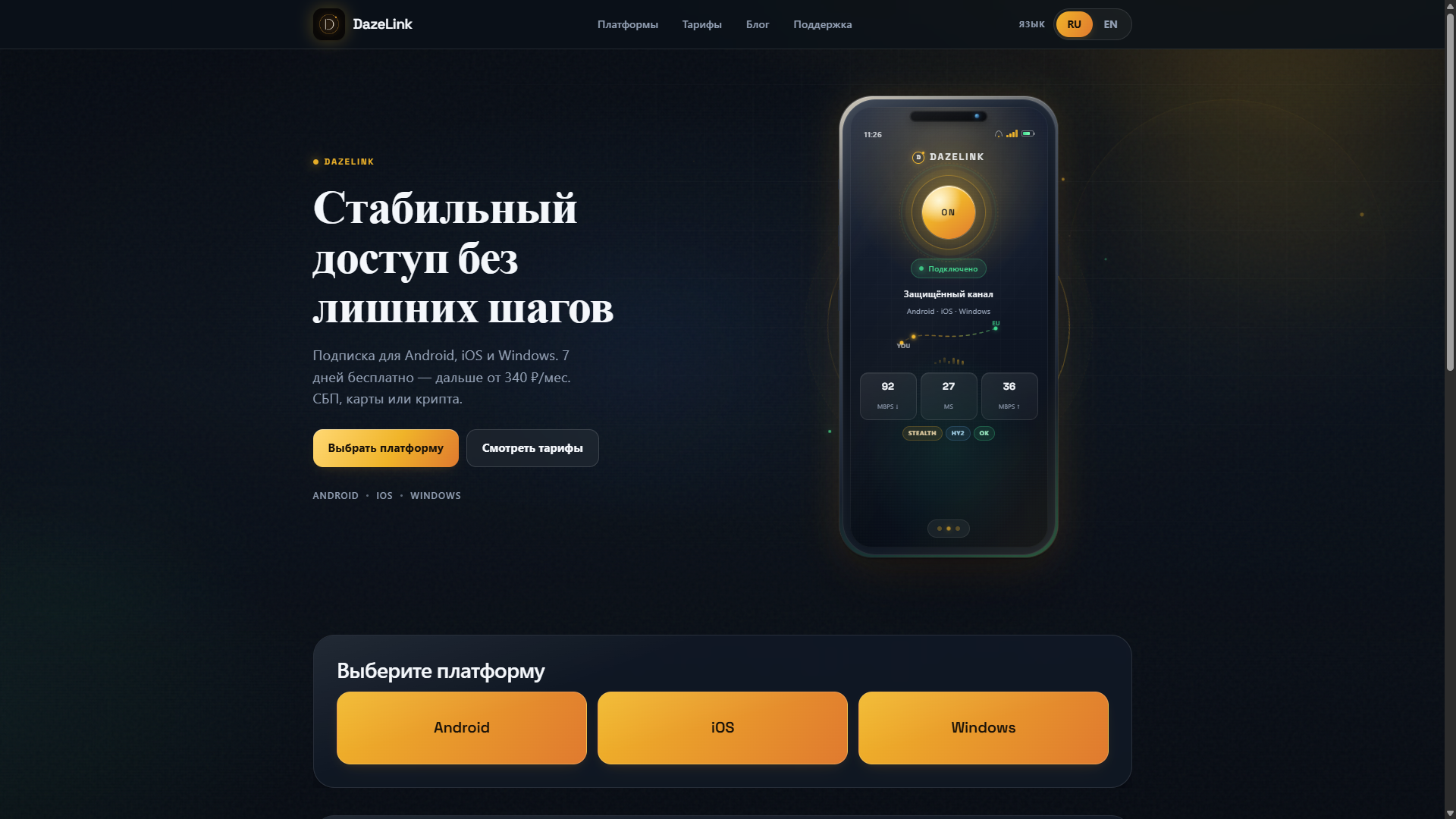
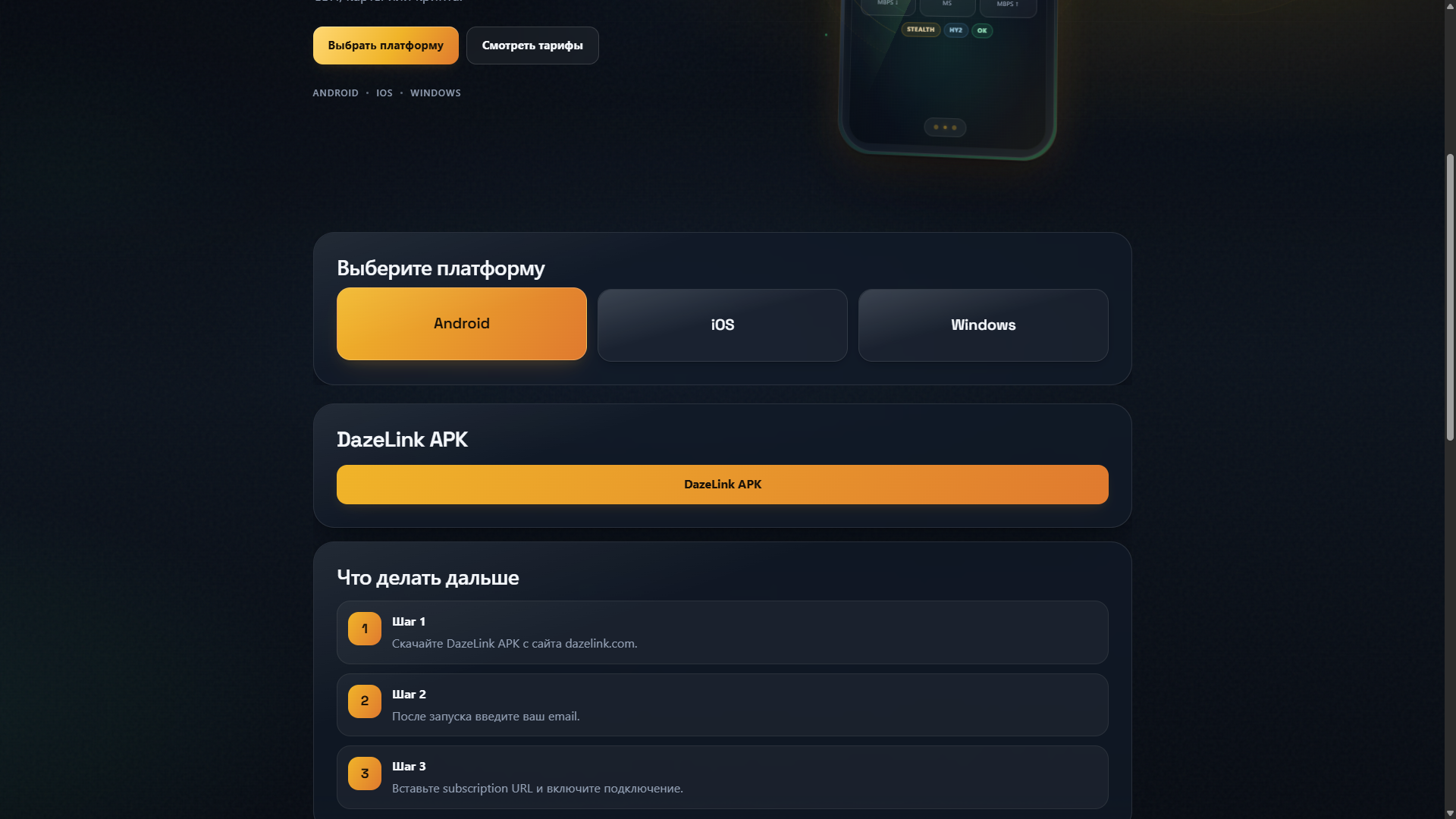
- На сайте нажмите Android, затем кнопку DazeLink APK.
- Откройте файл и подтвердите установку.
- Если система просит разрешение на установку из источника — разрешите только для этого действия, затем верните запрет в настройках.
Не ставьте «моды», репаки и APK с форумов «тот же клиент, но gratis». Для стабильности и безопасности важна сборка с официального канала. Подробнее: официальный APK.
Шаг 3. Первый запуск
- Откройте DazeLink.
- Дождитесь загрузки профиля / статуса готовности (или введите email / subscription URL по подсказке клиента).
- Нажмите подключение.
- Подтвердите системный диалог Android про VPN.
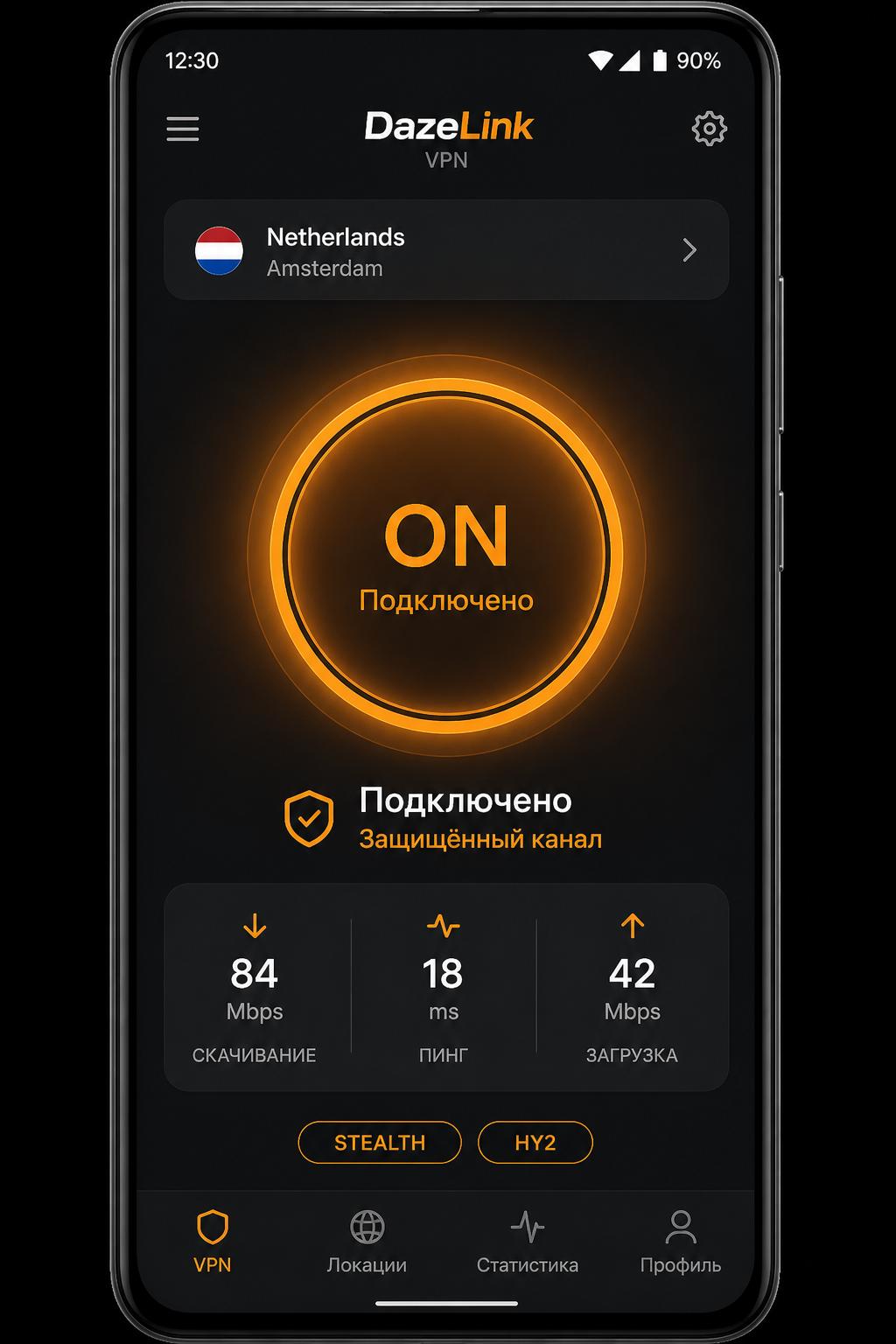
Системный запрос — нормальная защита ОС, не «взлом». Без него туннель не поднимется.
Если не подключается
Вечная загрузка профиля. Проверьте интернет без VPN. Перезапустите приложение. Убедитесь, что тариф активен.
Подключилось, сайты недоступны. Отключите другие VPN, proxy и агрессивный «частный DNS» для теста. Переподключите туннель.
На LTE хуже, чем на Wi‑Fi. Частый кейс фильтрации оператора. Обновите профиль и смените транспорт. Чеклист: обход блокировок. Имена профилей: VLESS / Hysteria2.
Нужен iPhone рядом. Там Anywhere Proxy + subscription URL: vpn-ios-anywhere-proxy. Happ — если уже установлен: подписка.
Антивирус ругается на APK. Эвристика часто реагирует на VPN-разрешения. Критичен источник: файл с dazelink.com. При сомнении скачайте повторно с сайта и сравните.
Android vs «ключ в чужой клиент»
DazeLink на Android заточен под свой каталог и обновление профилей. Ручной импорт случайных URI в сторонние клиенты даёт рассинхрон: ключ умер, а вы чините «приложение». Для телефона как основного канала удобнее официальный клиент.
Браузерное расширение на Android не заменяет системный VPN. Если ищете «обход только в Chrome» — читайте расширение или клиент, но для мессенджеров и приложений нужен клиент.
Безопасность на телефоне
- Качайте APK только с dazelink.com.
- Не отправляйте скрины с токенами в публичные чаты.
- После установки верните запрет неизвестных источников.
- Не давайте приложению доступ к аккаунту Google «на всякий случай» — VPN-клиенту это не нужно сверх системного VPN.
Привычки, которые экономят время
- После оплаты или продления один раз перезапустите клиент / обновите профиль.
- Не храните «старый APK год на флешке» — берите актуальную сборку с сайта.
- Не гоняйте одновременно телефон и ПК на одном тарифе без понимания лимитов.
- Перед важной поездкой проверьте LTE заранее.
Мини-чеклист перед поддержкой
- Модель и версия Android (Настройки → О телефоне).
- Сеть: Wi‑Fi или LTE; воспроизводится ли на второй сети.
- Что уже сделали: переустановка, обновление профиля, отключение других VPN.
- Email аккаунта — без URL и паролей.
Пишите в поддержку. Новости: t.me/DazeLink_com.
Частые вопросы
Это бесплатный VPN навсегда?
Модель — аккаунт и тарифы. Актуальные условия: pricing.
Нужен root?
Нет.
Можно ли на Android TV?
Зависит от устройства и способа установки APK. Базовый гайд — про телефон; TV уточняйте в поддержке.
Где Windows?
Чем этот хаб отличается от статьи про APK?
Здесь полный путь установки и эксплуатации. Статья про APK — про риски сторонних сборок и выдачу поиска.
Связанные материалы
- Официальный Android APK
- Обход блокировок
- Протоколы
- iOS / Anywhere Proxy · Happ (alt)
- Windows · Тарифы
Экономия батареи и фон
VPN держит туннель — расход чуть выше обычного. Если Android «убивает» приложение в фоне, включите автозапуск/игнорирование оптимизации батареи для DazeLink (название пункта зависит от прошивки Xiaomi/Samsung/Huawei). Иначе после ночи профиль «отвалится» и утром покажется, что «VPN сломался».
Не ставьте агрессивные «чистильщики» RAM, которые выгружают сетевые сервисы. Для диагностики временно отключите такие утилиты.
Обновление клиента без потери доступа
Скачивайте новую сборку с сайта поверх старой. Если установщик просит удалить старое приложение — сначала убедитесь, что знаете email аккаунта и можете снова получить доступ на сайте. После обновления один раз откройте клиент и дождитесь обновления профиля, не переключайтесь между сетями в эти 10–20 секунд.
Две SIM и разные операторы
На телефоне с двумя SIM поведение LTE может отличаться. Если на одной SIM стабильно, а на другой нет — это аргумент для поддержки и повод держать запасной профиль, а не сразу переустанавливать APK.
Telegram, YouTube и Android TV на одном APK
Один официальный клиент закрывает типичные запросы «vpn для telegram android», «vpn youtube android» и «apk для android tv»:
- Telegram / YouTube — если общий интернет через DazeLink есть, а мессенджер или видео «тупят», сначала смените профиль/сервер и отключите второй VPN или браузерный обход. Не ставьте отдельный «VPN только для YouTube» поверх — двойной туннель почти всегда хуже.
- Мобильный интернет — LTE часто фильтрует жёстче Wi‑Fi. Держите запасной профиль и чеклист стабильности.
- Android TV — установка APK зависит от прошивки (файловый менеджер, ADB, магазин). Берите тот же официальный файл с dazelink.com, что и для телефона; если TV не принимает VPN-разрешение — уточните в поддержке модель, не скачивайте «TV-сборку» с неизвестных сайтов.
Антивирус на телефоне может ругаться на VPN-разрешения — критичен источник файла (сайт DazeLink), а не сам факт APK.
Похожие запросы (сателлиты)
Формулировки «мобильный vpn», «лучший vpn для android», «vpn для телефона» ведут сюда и на официальный APK.
Итог
Для «vpn android» и «vpn для телефона» схема короткая: доступ на сайте → APK с dazelink.com → системное разрешение VPN → подключение. Если ломается на LTE или после обновления — начните с обновления профиля и чеклиста стабильности, а не с десятой переустановки из случайного зеркала.
VPN on Android — installing DazeLink and your first connection
Searches like "vpn android", "vpn android download", "vpn for android", "vpn for phone" almost always mean the same thing: a clear client for a smartphone, without a ten-screen quest. Below is the DazeLink hub: site → access → official APK → system VPN permission → stable operation on Wi‑Fi and LTE.
Separately, on APK safety and search-result traps: VPN Android APK officially.
What you'll need
- A smartphone with a recent version of Android.
- The ability to install an APK from the site (not necessarily Google Play).
- An email to get access on the homepage.
- Understanding that a "free VPN from the top of Play Store" and DazeLink access are different products.
The official entry point is dazelink.com. Not "mirrors" with a similar domain from ads.
Step 1. Get access
- Open DazeLink.
- Enter your email, pass verification.
- Wait for the access-issuing flow to complete.
- If needed, pay for a term on pricing.
Without active access, the client can't reliably fetch a working profile — even if the APK is already installed.
Step 2. Download and install the APK
- On the site, choose the Android download (or the downloads section).
- Open the file and confirm installation.
- If the system asks for permission to install from an unknown source — allow it only for this action, then revert the restriction afterward in settings.
Don't install "mods," repacks, or APKs from forums claiming "same client, but free." A build from the official channel matters for both stability and safety. More details: official APK.
Step 3. First launch
- Open DazeLink.
- Wait for the profile to load / for a ready status.
- Tap connect.
- Confirm Android's system dialog about VPN.
The system prompt is a normal OS safeguard, not a "hack." Without it, the tunnel won't come up.
If it won't connect
The profile keeps loading forever. Check the internet without VPN. Restart the app. Make sure your plan is active.
Connected, but sites are unreachable. Disable other VPNs, proxies, and aggressive "private DNS" for the test. Reconnect the tunnel.
Worse on LTE than on Wi‑Fi. A common case of carrier filtering. Refresh the profile and switch transport. Checklist: bypassing blocks. Profile names: VLESS / Hysteria2.
Need an iPhone nearby too. There it's Anywhere Proxy + subscription URL: vpn-ios-anywhere-proxy. Happ — if it's already installed: subscription.
Antivirus flags the APK. Heuristics often react to VPN permissions. What matters is the source: the file from dazelink.com. If in doubt, download it again from the site and compare.
Android vs. "key in someone else's client"
DazeLink on Android is tailored to its own catalog and profile updates. Manually importing random URIs into third-party clients causes desync: the key dies and you end up fixing "the app." For a phone as your main channel, the official client is more convenient.
A browser extension on Android doesn't replace a system VPN. If you're looking for "bypass just in Chrome," read extension or client, but messengers and apps still need a client.
Security on your phone
- Download the APK only from dazelink.com.
- Don't send screenshots with tokens to public chats.
- After installing, revert the "unknown sources" restriction.
- Don't grant the app access to your Google account "just in case" — a VPN client doesn't need more than the system VPN permission.
Habits that save time
- After paying or renewing, restart the client / refresh the profile once.
- Don't keep "the same APK for a year on a flash drive" — grab the current build from the site.
- Don't run phone and PC simultaneously on one plan without understanding the limits.
- Check LTE ahead of an important trip.
Mini-checklist before contacting support
- Android model and version (Settings → About phone).
- Network: Wi‑Fi or LTE; does it reproduce on the other network.
- What you've already tried: reinstall, profile refresh, disabling other VPNs.
- Account email — no URLs or passwords.
Contact support. News: t.me/DazeLink_com.
Frequently asked questions
Is this a free VPN forever?
The model is account-based with plans. Current terms: pricing.
Do I need root?
No.
Can I use it on Android TV?
Depends on the device and how the APK is installed. This is the basic phone guide; ask support about TV.
Where's Windows?
How is this hub different from the APK article?
This one covers the full installation and usage path. The APK article covers the risks of third-party builds and search results.
Related materials
Battery use and background operation
VPN keeps a tunnel up, so battery use is a bit higher than usual. If Android "kills" the app in the background, enable auto-start / ignore battery optimization for DazeLink (the exact setting name depends on your Xiaomi/Samsung/Huawei firmware). Otherwise the profile will "drop" overnight and it will seem like "the VPN broke" in the morning.
Don't use aggressive RAM "cleaner" apps that unload network services. Disable such utilities temporarily for diagnostics.
Updating the client without losing access
Download the new build from the site over the old one. If the installer asks to remove the old app first, first make sure you know your account email and can get access again on the site. After updating, open the client once and wait for the profile to refresh; don't switch networks during those 10–20 seconds.
Dual SIM and different carriers
On a dual-SIM phone, LTE behavior can differ. If it's stable on one SIM but not the other, that's worth telling support, and a reason to keep a backup profile rather than immediately reinstalling the APK.
Telegram, YouTube, and Android TV on one APK
One official client covers “vpn for telegram android,” “vpn youtube android,” and “apk for android tv”:
- Telegram / YouTube — if general internet via DazeLink works but a messenger or video stalls, switch profile/server and turn off a second VPN or browser bypass. Don’t stack a “YouTube-only VPN” on top.
- Mobile data — LTE often filters harder than Wi‑Fi. Keep a backup profile and the stability checklist.
- Android TV — APK install depends on firmware. Use the same official file from dazelink.com as on a phone; if TV rejects the VPN permission, ask support with the model — don’t download a mystery “TV build.”
Antivirus may flag VPN permissions — the file source (DazeLink site) matters more than the APK itself.
Related searches (satellites)
“Mobile vpn,” “best vpn for android,” and “vpn for phone” point here and to the official APK.
Bottom line
For "vpn android" and "vpn for phone," the flow is short: get access on the site → APK from dazelink.com → system VPN permission → connect. If it breaks on LTE or after an update, start by refreshing the profile and the stability checklist, not by reinstalling for the tenth time from a random mirror.
Android'de VPN — DazeLink Kurulumu ve İlk Bağlantınız
"vpn android", "vpn android download", "vpn for android", "vpn for phone" gibi aramalar genellikle aynı şeyi ifade eder: akıllı telefon için basit bir istemci, karmaşık adımlar olmadan. Aşağıda DazeLink hub’ı yer alıyor: site → erişim → resmi APK → sistem VPN izni → Wi‑Fi ve LTE’de kararlı çalışma.
APK güvenliği ve arama sonuçlarındaki tuzaklar hakkında ayrıca: VPN Android APK officially.
Neye İhtiyacınız Var
- Güncel Android sürümüne sahip bir akıllı telefon.
- Site üzerinden APK yükleyebilme imkanı (Google Play zorunlu değil).
- Erişim almak için bir e-posta adresi (ana sayfa).
- "Play Store'un en üstündeki ücretsiz VPN" ile DazeLink erişiminin farklı ürünler olduğunu anlama.
Resmi giriş noktası dazelink.com. Reklamlardan gelen benzer alan adlı "yansımalar" değil.
Adım 1. Erişim Alın
- DazeLink'i açın.
- E-posta adresinizi girin, doğrulama yapın.
- Erişim verme sürecinin tamamlanmasını bekleyin.
- Gerekirse fiyatlandırma sayfasından bir dönem satın alın.
Aktif erişim olmadan istemci güvenilir şekilde çalışan bir profil çekemez — APK kurulu olsa bile.
Adım 2. APK’yı İndirin ve Kurun
- Sitede Android indirme seçeneğini (veya indirmeler bölümünü) seçin.
- Dosyayı açın ve kurulumu onaylayın.
- Sistem bilinmeyen kaynaktan kurulum izni isterse bunu yalnızca bu işlem için izin verin, ardından ayarlardan kısıtlamayı geri getirin.
Forumlar üzerinden "aynı istemci ama ücretsiz" diye sunulan mod, repack veya APK’ları kurmayın. Kararlılık ve güvenlik için resmi kanaldan gelen derleme önemlidir. Daha fazla bilgi: official APK.
Adım 3. İlk Başlatma
- DazeLink’i açın.
- Profilin yüklenmesini / hazır durumunu bekleyin.
- Bağlan’a dokunun.
- Android’in sistem VPN iletişim kutusunu onaylayın.
Sistem uyarısı normal bir işletim sistemi korumasıdır, "hack" değildir. Bu izin olmadan tünel oluşmaz.
Bağlanamıyorsa
Profil sürekli yükleniyor. VPN olmadan interneti kontrol edin. Uygulamayı yeniden başlatın. Planınızın aktif olduğundan emin olun.
Bağlandı ancak sitelere ulaşılamıyor. Test için diğer VPN’leri, proxy’leri ve agresif "özel DNS" ayarlarını devre dışı bırakın. Tüneli yeniden kurun.
LTE’de Wi‑Fi’ye göre daha kötü. Operatör filtrelemesi yaygın bir durumdur. Profili yenileyin ve taşıma yöntemini değiştirin. Kontrol listesi: bypassing blocks. Profil adları: VLESS / Hysteria2.
Yakında bir iPhone da gerekiyor. Orada Anywhere Proxy + abonelik URL’si kullanılır: vpn-ios-anywhere-proxy. Happ zaten kuruluysa: subscription.
Antivirüs APK’yı işaretliyor. Heuristikler genellikle VPN izinlerine tepki verir. Önemli olan kaynak: dazelink.com’dan gelen dosya. Şüpheniz varsa dosyayı siteden tekrar indirin ve karşılaştırın.
Android vs. "Başka Bir İstemciye Anahtar Girme"
Android’deki DazeLink kendi kataloğuna ve profil güncellemelerine göre uyarlanmıştır. Üçüncü taraf istemcilere rastgele URI’ler manuel olarak aktarmak senkronizasyon sorununa yol açar: anahtar çalışmaz ve "uygulama" sorunuyla uğraşmak zorunda kalırsınız. Telefon ana kanalınızsa resmi istemci daha kullanışlıdır.
Android’de tarayıcı uzantısı sistem VPN’in yerini almaz. Yalnızca Chrome için "bypass" arıyorsanız extension or client yazısını okuyun, ancak mesajlaşma ve diğer uygulamalar için istemci gerekir.
Telefonda Güvenlik
- APK’yı yalnızca dazelink.com'dan indirin.
- Jeton içeren ekran görüntülerini herkese açık sohbetlere göndermeyin.
- Kurulumdan sonra "bilinmeyen kaynaklar" kısıtlamasını geri getirin.
- Uygulamaya "gerekirse" Google hesabınıza erişim izni vermeyin — bir VPN istemcisi sistem VPN izninden fazlasına ihtiyaç duymaz.
Zaman Kazandıran Alışkanlıklar
- Ödeme veya yenileme sonrası istemciyi yeniden başlatın / profili bir kez yenileyin.
- "Bir yıl boyunca aynı APK’yı flash bellekte saklamayın" — güncel derlemeyi siteden alın.
- Plan limitlerini anlamadan telefonu ve bilgisayarı aynı anda kullanmayın.
- Önemli bir yolculuktan önce LTE’yi kontrol edin.
Destekle İletişime Geçmeden Önce Mini Kontrol Listesi
- Android model ve sürümü (Ayarlar → Telefon hakkında).
- Ağ: Wi‑Fi veya LTE; diğer ağda da aynı sorun yaşanıyor mu.
- Daha önce denenenler: yeniden kurulum, profil yenileme, diğer VPN’leri devre dışı bırakma.
- Hesap e-postası — URL veya şifre yok.
İletişim: support. Haberler: t.me/DazeLink_com.
Sık Sorulan Sorular
Bu sonsuza kadar ücretsiz VPN mi?
Model, hesap tabanlı planlara dayanır. Güncel koşullar: pricing.
Root gerekiyor mu?
Hayır.
Android TV’de kullanabilir miyim?
Cihaz ve APK kurulum yöntemine bağlıdır. Bu temel telefon kılavuzudur; TV için destekle iletişime geçin.
Windows nerede?
Bu hub APK makalesinden nasıl farklı?
Bu yazı tam kurulum ve kullanım yolunu kapsar. APK makalesi üçüncü taraf derlemelerin ve arama sonuçlarının risklerini ele alır.
İlgili Materyaller
Pil Kullanımı ve Arka Planda Çalışma
VPN tüneli açık tuttuğu için pil kullanımı normalden biraz daha yüksektir. Android uygulamayı arka planda "öldürürse" DazeLink için otomatik başlatma / pil optimizasyonunu yoksayma ayarını etkinleştirin (tam ayar adı Xiaomi/Samsung/Huawei donanım yazılımına göre değişir). Aksi takdirde profil gece boyunca "düşer" ve sabah "VPN bozuldu" gibi görünür.
Ağ hizmetlerini boşaltan agresif RAM temizleyici uygulamalar kullanmayın. Teşhis için bu tür araçları geçici olarak devre dışı bırakın.
Erişimi Kaybetmeden İstemciyi Güncelleme
Yeni derlemeyi siteden eski dosyanın üzerine indirin. Yükleyici eski uygulamayı kaldırmanızı isterse önce hesap e-postanızı bildiğinizden ve site üzerinden erişimi yeniden alabileceğinizden emin olun. Güncellemeden sonra istemciyi bir kez açın ve profilin yenilenmesini bekleyin; bu 10–20 saniye boyunca ağ değiştirmeyin.
Çift SIM ve Farklı Operatörler
Çift SIM’li telefonda LTE davranışı farklılık gösterebilir. Bir SIM’de kararlı çalışıp diğerinde çalışmıyorsa bunu desteğe bildirmeye değer ve hemen APK’yı yeniden kurmak yerine yedek profil bulundurmak için bir nedendir.
Tek APK ile Telegram, YouTube ve Android TV
Tek resmi istemci “vpn for telegram android”, “vpn youtube android” ve “apk for android tv”yi kapsar:
- Telegram / YouTube — Genel internet DazeLink üzerinden çalışıyorsa ancak bir mesajlaşma uygulaması veya video takılıyorsa profili/sunucuyu değiştirin ve ikinci bir VPN veya tarayıcı bypass’ını kapatın. Üstüne “yalnızca YouTube VPN” eklemeyin.
- Mobil veri — LTE genellikle Wi‑Fi’den daha fazla filtreler. Yedek profil ve stability checklist bulundurun.
- Android TV — APK kurulumu donanım yazılımına bağlıdır. Telefondaki gibi dazelink.com adresinden aynı resmi dosyayı kullanın; TV VPN iznini reddederse model bilgisiyle desteğe sorun — gizemli bir “TV derlemesi” indirmeyin.
Antivirüs VPN izinlerini işaretleyebilir — dosya kaynağı (DazeLink sitesi) APK’nın kendisinden daha önemlidir.
İlgili Aramalar (satellites)
“Mobile vpn,” “best vpn for android,” ve “vpn for phone” buraya ve official APK sayfasına işaret eder.
Sonuç
"vpn android" ve "vpn for phone" için akış kısadır: site üzerinden erişim alın → dazelink.com’dan APK → sistem VPN izni → bağlanın. LTE’de veya güncelleme sonrası sorun yaşarsanız önce profili yenileyin ve stability checklist uygulayın, rastgele bir yansıma üzerinden onuncu kez yeniden kurulum yapmayın.